Architecture
Toboggan is a Rust workspace built around a shared core model, a stateful server, and multiple thin clients.
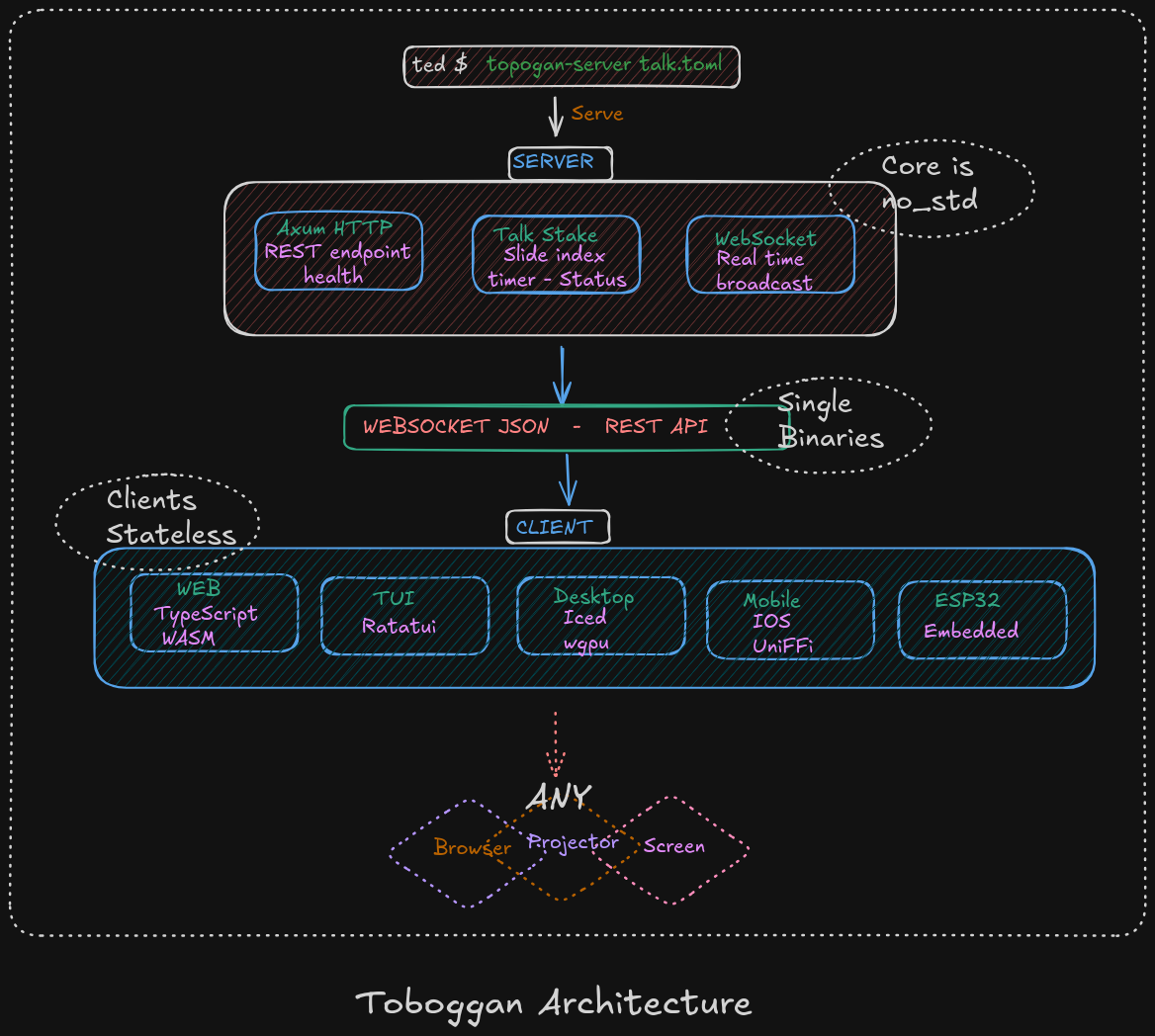
Workspace shape
| Crate | Role |
|---|---|
toboggan-core | Shared domain model: talks, slides, commands, notifications, timestamps, durations |
toboggan-server | Axum server, presentation state owner, WebSocket broadcast hub |
toboggan-cli | Folder-to-presentation converter and statistics reporter |
toboggan-client | Async client helpers for HTTP + WebSocket connections |
toboggan-tui | Terminal presenter/client based on ratatui |
toboggan-web | Browser UI built with TypeScript and Vite |
toboggan-mobile | UniFFI bindings for Swift and Kotlin consumers |
toboggan-stats | Word counts, duration estimates, and presentation metrics |
toboggan-desktop | Separate iced/wgpu desktop app workspace |
How the pieces fit together
flowchart LR
	author[Author / source folder] --> cli[toboggan-cli]
	author --> server[toboggan-server]
	cli --> talk[(TOML talk file)]
	talk --> server
	server --> core[toboggan-core]
	server --> stats[toboggan-stats]
	server --> clientlib[toboggan-client]
	clientlib --> tui[toboggan-tui]
	clientlib --> web[toboggan-web]
	clientlib --> mobile[toboggan-mobile]
	clientlib --> desktop[toboggan-desktop]
Runtime responsibilities
toboggan-coreowns the shape of the data and protocol messages.toboggan-cliturns a source folder into a serialized talk and prints useful statistics.toboggan-serverloads the talk, validates config, serves HTTP endpoints, and broadcasts WebSocket notifications.toboggan-clienthandles connection setup, retries, and protocol messages shared by several frontends.toboggan-statscomputes duration estimates and word counts from the parsed talk.toboggan-web,toboggan-tui,toboggan-mobile, andtoboggan-desktopare presentation clients that mostly render state and send commands.
Protocol shape
The protocol is JSON over WebSocket and uses the shared enums from toboggan-core:
- Client commands:
Register,Unregister,Ping,First,Last,GoTo,NextSlide,PreviousSlide,NextStep,PreviousStep,Blink - Server notifications:
State,Error,Pong,Blink,TalkChange,Registered,ClientConnected,ClientDisconnected
Why the workspace is split
- The core/server/cli/client crates stay relatively light and compile quickly.
- Desktop is isolated in a separate workspace because
icedandwgpusignificantly increase compile time and memory usage. - Web, mobile, and terminal clients can all reuse the same core protocol and data model.