Toolchain
In general, the set of programming tools used to create a program is referred to as the toolchain. The toolchain used here consists of the following:
- Assembler
- Linker
- Loader
- Debugger
5.1 - Assemble / Link / Load Overview
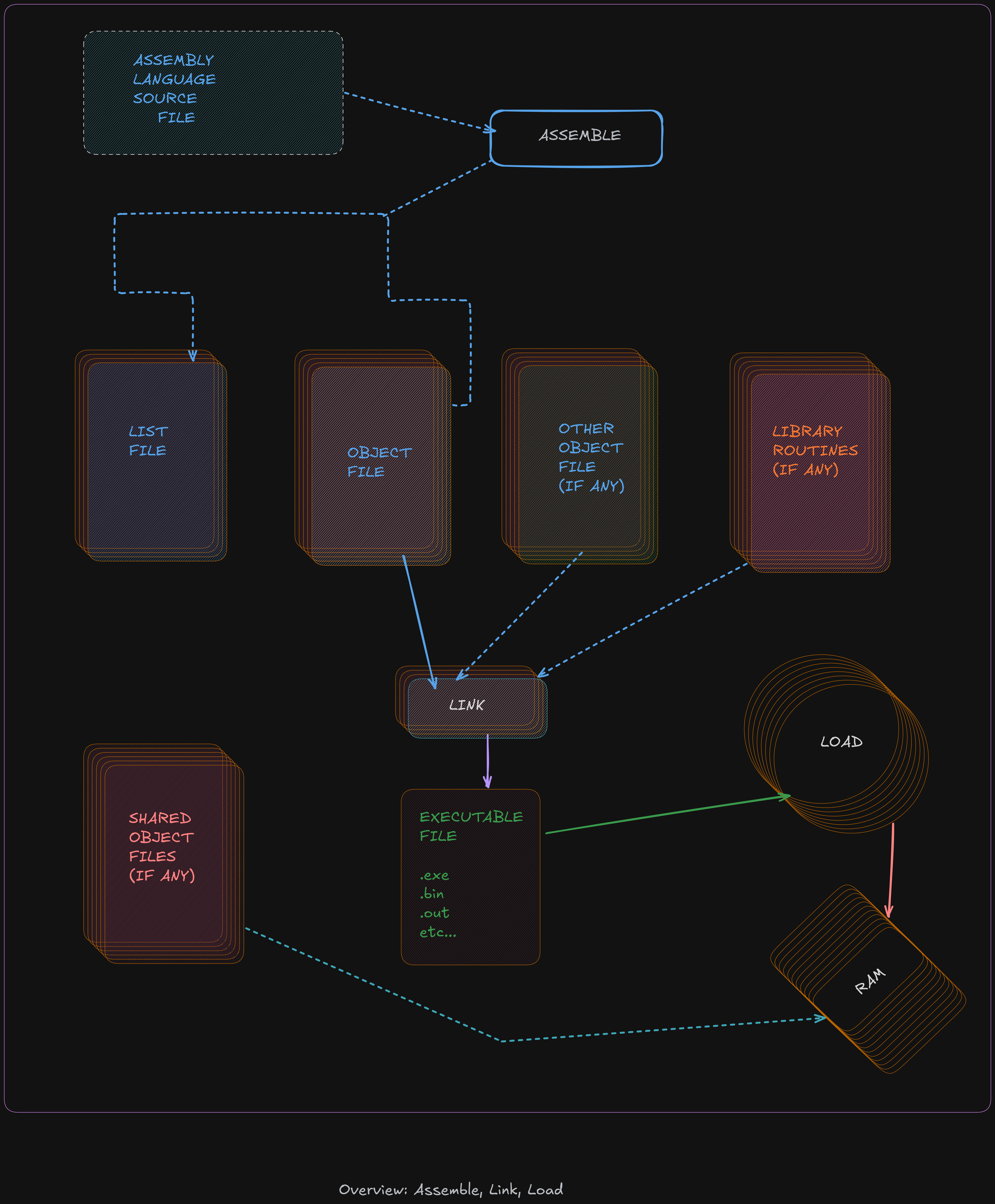
The source code file passes through multiple stages before becoming an executable program
during the assemble, link, and load process.
The human-readable source code file is converted into an object file by the
assembler, which is then transformed into an executable by the linker, and the
executable is loaded into memory with the help of loader.
Assembler
The assembler is a program that will read an assembly language source code containing assembly instruction in input file and convert the code into a machine language binary (bytecode).
During this process the comment are removed and variable names and label are converted into appropriate addres (as required by the CPU during execution)
The assembler used here is yasm.
yasm -g dwarf2 -f elf64 example.asm -l example.lst
-g dwarf2: it used to specify to assembler to include debugging information in object file (.o)-f elf64: Informs the assembler to create the object file inelf64format (which is appropriate to 64-bit Linux based-system)axample.asm: is a assembly source file in input.-l example.lst: in form assembler to create a list file namedexample.lst
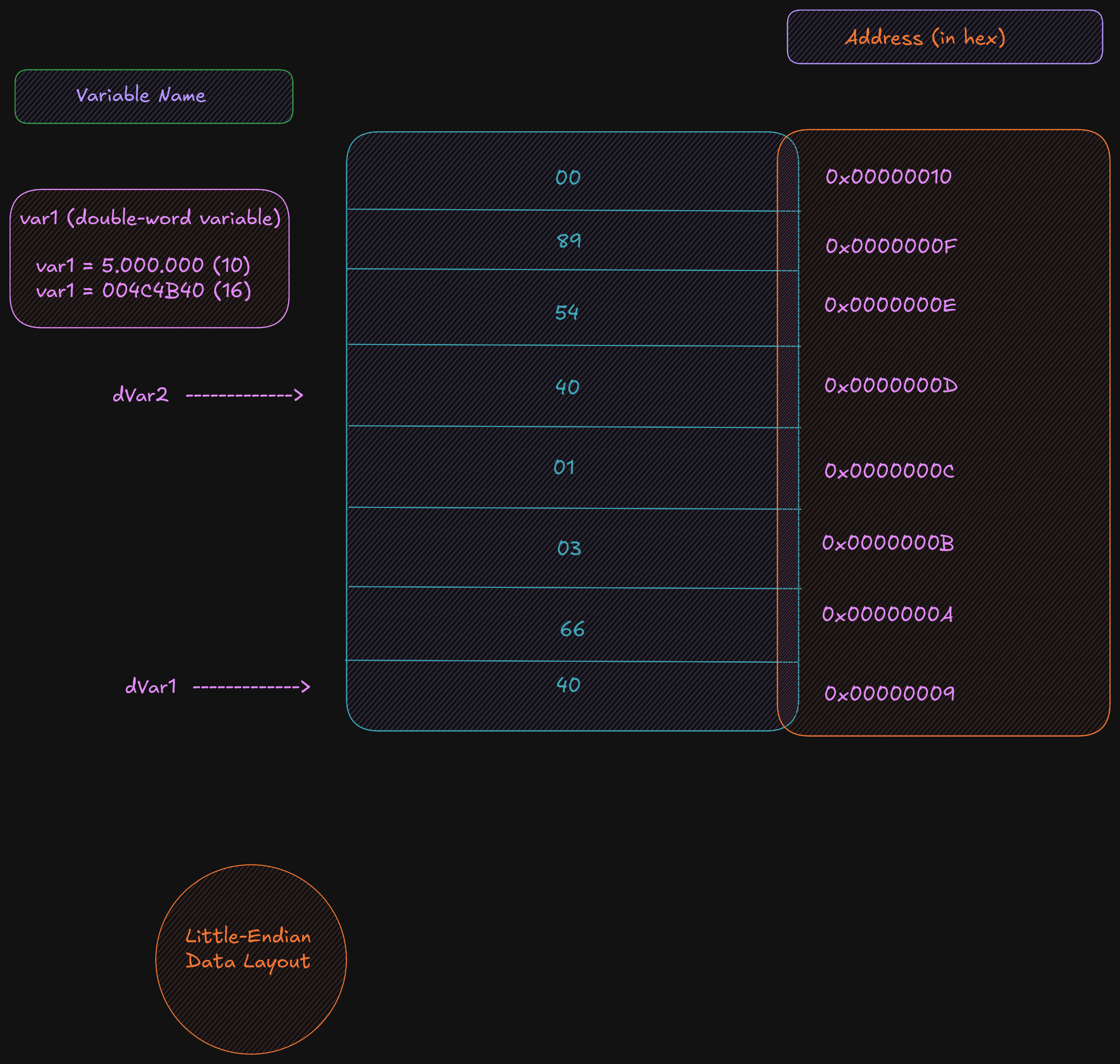
But what is a list file? A list file shows the line number, the relative address, the machine-language version of the instruction (including variable references), and the original source line. This information is useful when debugging.
36 00000009 40660301		dVar1	dd		17000000
37 0000000D 40548900		dVar2	dd		9000000
38 00000011 00000000		dResult	dd		0
- Line 36
- relativ address :
0x00000009stored in the data area - double-word variable:
dVar1requires four-bytes. - next address is
0x0000000DsodVar1uses a0x00000009,0x0000000A,0x0000000B,0x0000000C 0x40660301is the value in hex, as placed in memory. A17000000is0x01036640.in hex. Remember that the architecture used here is little-endian; theLSB(0x40) is placed in the lowest memory address.- A
0x40is placed at0x00000009next0x66is placed in address0x0000000A
For example, a fragment of the list file text section, excerpted from the example program in the previous chapter is as follows:
95						last:
96	0000005A 48C7C03C000000		mov		rax, SYS_exit
97	00000061 48C7C300000000		mov		rdi, EXIT_SUCCESS
98	00000068 0F05				syscall
- Again, the number to the left are the line numbers, the net number
0x0000005Ais the relative address if where the line of code is placed. - The next number
0x48C7C03C000000is the machine language version of instruction, in hex , that the CPU reads and understands. - The rest of the line is the original assembly language source instruction.
- The label
last:does not have a machine language instruction, it not a executable instruction.
Two-Pass Assembler
The assembler will read a source code and convert it in bytecode who it translate in binary (understand by CPU) The 1’s and 0’s are referred to as machine language. This relationship between assembly code and binary readable language means that machine language can be converted back to human readable, but of course the comment, variable names and label names are missing, so the resulting code can be very difficult to read.
Each line read by the assembler has her instruction generated, but in case when a instructions is a jumps like If statements or unconditional jumps, it not possible to perform the convertion of this instructions.
Ex :
mov		rax, 0
jmp		skipRest
...
...
...
skipRest:
Reading line by line a assembler cannot know if a skipRest is defined or just exist when it read a line when it called, the solution for that is to read a file twice, it know by name of two-pass assembler.
Fisrt pass
This step vary of the design specific assembler, but several basic operations performed is:
- Create symbol table
- Expand macros
- Evaluate constant expressions
A macro is a program element that is expanded into a set of programmer predefinned
instructions.
A constant expression is an expression composed entirel of contants.
By example if a constant is used in one line do a operations, if we know from begenning that it was
declared this line can be read, understand and executed without problem.
Ex:
mov rax, BUFF+5
Second pass
The steps taken on the second pass vary based on design of the specific assembler. The differents basic operation performed on the second pass include :
- Final generation of code
- Creation of list file (if requested)
- Create object file
The generation of code is about to the conversion of the assembly language into the CPU executable machine instruction. Knowing that a one-to-one correspondance, is used for transform instructions (instructions that do not use symbols on either the first or second pass)
A based assembler design can help to done code generation be done on the first or all done on the second pass. In much case a final generation is performed on second pass and require using the symbol table to check program symbols and obtain the appropriate addresses from the table.
Assembler Directives
Assembler directives are instructions to the assembler that direct the assembler to do something. This might be formatting or layout. These directives are not translated into instructions for the CPU.
Linker
The linker, sometimes referred to as linkage editor, will combine one or more object files into a single executable file including any neccesary libraries . A example using example file from previous chapter with GNU gold linker.
ld -g -o example example.o
-gis used to included debugging information in the final executable file.-ospecifies to create a executable file name example (with no extension) when the-ois ommitted the output file is nameda.outThe linker reader aexample.ofile who is input here, note that you can name you file like what you want and not need to have the same name as any of the input object files.
It is also possible to link multiple object files.
ld -g -o example main.o example.o
When a function are located in external source file, any function not in the current source file must be declared as extern . Variables, such as global variables, in other source files can be accessed by using the extern statement as well, however data is typically transferred as arguments of the function call.
Linking Process
The object files and library routines are combined into a single executale module. As part of combining the object file, the linker must adjust the relocatable addresses as necessary.
Assuming there are two source files, the main and secondary source file
boths of which have been assembled into object file main.o and funcs.o .4
After assembles the calls to routines outside of file being assembled are declared with the external
assembler directive.
The code is not available for an external reference and such references are marked as external in the object file. The list file will show an R for such relocatable addresses. The linker must satisfy the external references. Additionally, the final location of the external references must be placed in the code. For example, if the main.o object file calls a function in the funcs.o file, the linker must update the call with the appropriate address as shown in the following illustration.
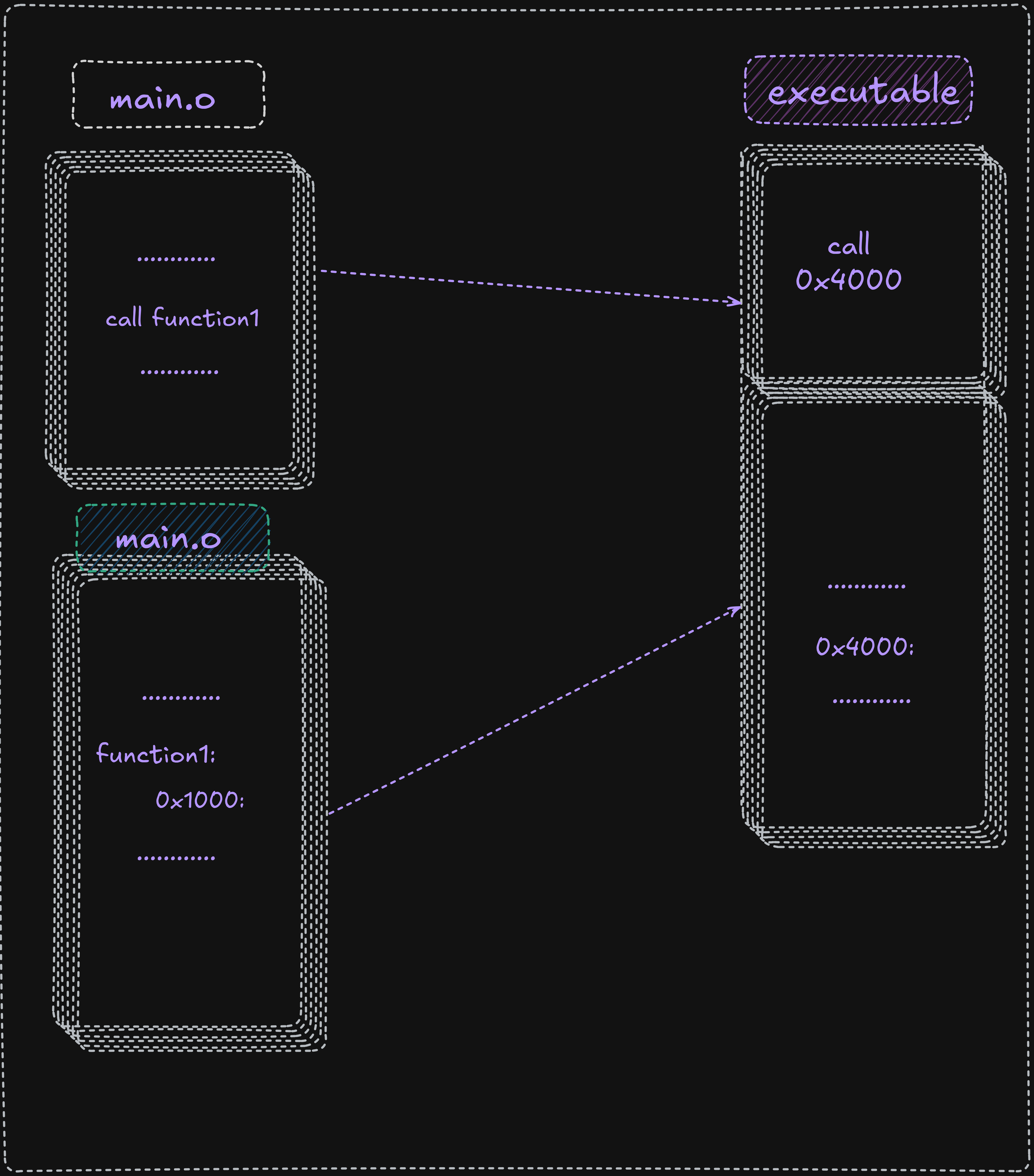
Here fnc1 is external to main.o it inside a funcs.o file and it marked with the R.
It started to relative address (0x100), and when it was combined with main.o the final executable
it adapt her and take 0x400 like address, and the linker insert this address into the call statement
in the main in order to complete the linking process and ensure the function call work correctly it
work with the relocatable adresses for both code and data.
Dynamic Linking
The linux Operating system supports dynamic linking who is represented by a .so (shared object file), which allows for postponing the resolution of some
symbols until a program is being executed.
The actual instructions are not placed in exacutable file and instead, if needed, resolved and accessed at run-time.
This approach offers two advantages:
- Commonly used libraries can be stored in a single location instead of being duplicated in every binary.
- If a bug in a shared library is fixed, programs that use it dynamically will benefit from the fix on next run.
- Disadvantages
- When a library is updated, the executable may break because it depends on the previous library version.
- A program using its own library must be trusted; replacing components can introduce compatibility issues.
Assemble / Link Script
For not wast a time for type always the command to assemble and link with ld it possible to write a script who do all
assembly and linking process
See below:
#!/bin/bash

# Simple assemble/link script

if [ -z $1 ]; then
echo "Usage: ./asm64 <asmMainFile> (no extension)"
exit
fi
#Verify no extensions were entered

if [ ! -e "$1.asm" ]; then
echo "Error, $1.asm not found."
echo "Note, do not enter file extensions."
exit
fi

# Compile, assemble, and link.

yasm -Worphan-labels -g dwarf2 -f elf64 $1.asm -l $1.lst

ld -g -o $1 $1.o
This script file can be name asm64 we don’t need obligatory a extension here because on linu
all is file.
chmod +x asm64 # to give execution right to script file
Execute it:
./asm64 example # to compile a file and give her the name example note that you can use another filename
Loader
The loader is a part of our opereationg system who load the file from secondary storage (Hard drive) to primary storage (RAM), it create a new process for executable, and load the code in memeory, the program is run when the executable is invoked
./example # the previous file created after linking and assembley
Debugger
The debugger is used for control program execution of program, if during execution
nothing is printed to user it possible to use debugger to check a result .
Multiple debugger exist but the GNU product is appreciated for our exporation.
So we used a GNU DDD who is a graphical interface for GDB.