Program Format
An assembly file contains several parts:
- Data section where initialized data is declared and defined.
- BSS section where uninitialized data is declared.
- Text section where code is placed.
Note that assembly uses a semicolon ; for comments; any text after ; is ignored.
Numbers can be specified in decimal, hex, or octal.
The default base is decimal.
All hex or base-16 values must be preceded with 0x.
For octal or base-8 values, use a q suffix like 777q.
A constant is defined with the equ keyword; its value cannot be changed during
program execution. It does not have an associated memory location or a fixed size
(byte, word, double-word); the size depends on the value.
<name> equ <value>
Ex:
SIZE equ 10000 ; Could be used as word or double-word but not a byte
Data Section
The Data section contains all initialized variables and constants. A naming
specification for your variables is simple:
It can start with an underscore or letter, followed by letters or numbers, including some special
characters.
<variablename> <dataType> <initialValue>
Refer to these tables for a series of examples using various data types.
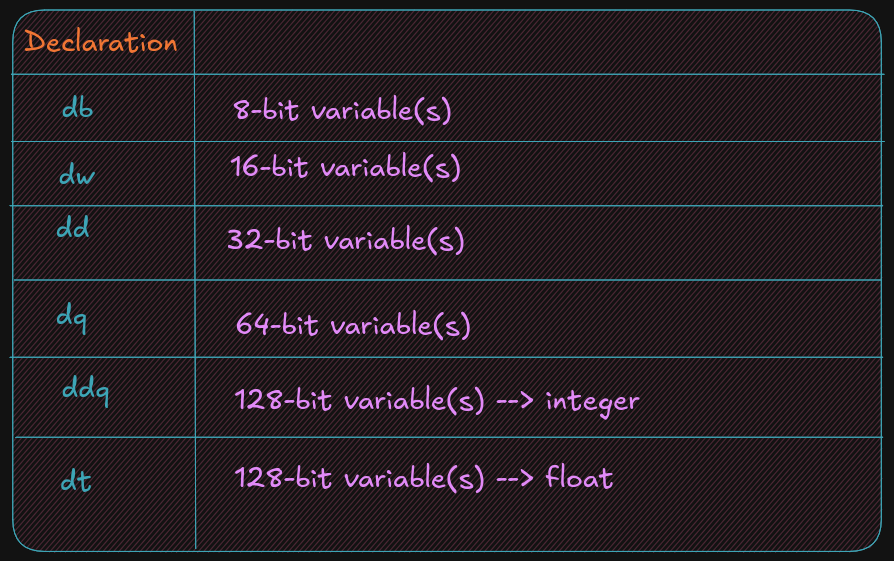
See the example below for common assembler directives used for initialized data declarations.
Here d means define.
bVar		db		10 					; byte variable
cVar		db		"H"					; single character
strng		db		"Hello World"		; string
wVar		dw		5000				; 16-bit variable
dVar		dd		50000				; 32-bit variable
arr			dd		100, 200, 300		; 3 element array
flt1		dd		3.14159				; 32-bit float
qVar		dq		1000000000			; 64-bit variable
The value specified here must fit the specified data type; for example,
a byte variable set to 500 would generate an assembler error.
BSS section
The BSS section contains uninitialized data or variables.
It uses the same declaration pattern as the Data section.
<variable> <resType> <count>
The supported data types are as follows:
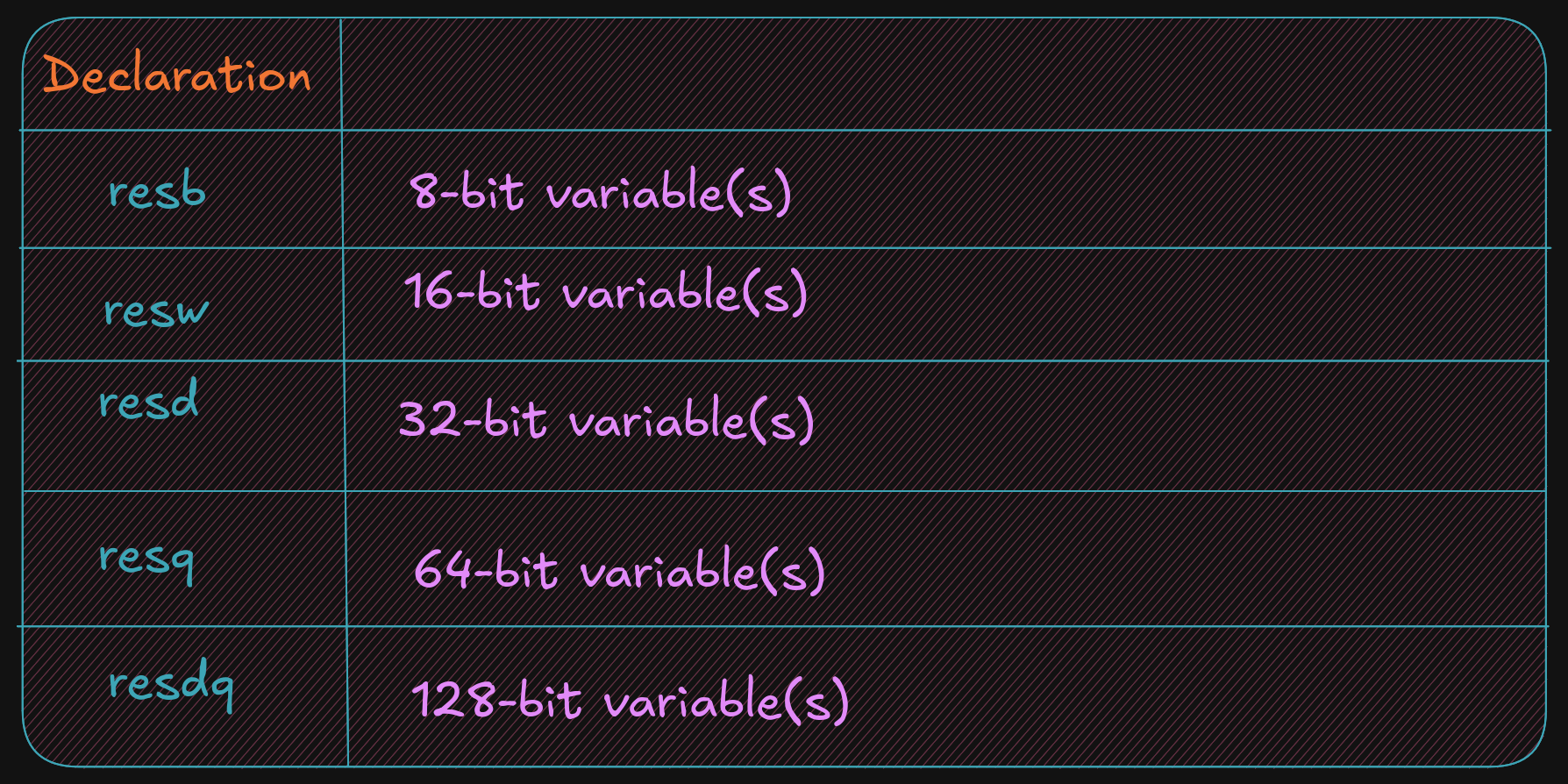
The following are common assembler directives for uninitialized data declarations.
bArr	resb		10 		; 10 element byte array
wArr	resw		50 		; 50 element word array
dArr	resd		100 	; 100 element double array
qArr	resq		200 	; 200 element quad array
Here res means reserve, and the last character after res tells you what type
of variable you want to reserve space for without allocating memory.
Text Section
The code is placed in the text section, and instructions are specified line by line.
The text section includes some headers or labels before the code that defines the initial program
entry point.
global _start
_start:
No special label or directives are required to terminate the program. A system service is used to inform the operating system that the program should be terminated and the resources, such as memory, recovered and re-used.
; Simple example demonstrating basic program format and layout.
; Ed Jorgensen
; July 18, 2014
; ************************************************************
; Some basic data declarations

section .data

; -----

; Define constants

EXIT_SUCCESS	equ		0 		; successful operation
SYS_exit		equ		60      ; call code for terminate

; -----

; Byte (8-bit) variable declarations

bVar1			db		17
bVar2			db		9
bResult			db		0

; -----

; Word (16-bit)	variable declarations

wVar1			dw		17000
wVar2			dw		9000
wResult			dw		0

; -----

; Double-Word (32-bit) variable declarations

dVar1			dd		17000000
dVar2			dd		9000000
dResult			dd		0

; -----

; quadword (64-bit) variable declarations

qVar1			dq		1700000000
qVar2			dq		900000000
qResult			dq		0

; ************************************************************
; Code Section

section		.text
global _start
_start:

; Performs a series of very basic addition operations
; to demonstrate basic program format.

; ----------
; Byte example
; bResult = bVar1 + bVar2

mov	al,	byte [bVar1]
add   al, byte [bVar2]
mov	byte [bResult], al

;------------
; Word example
; wResult = wVar1 + wVar2

mov	ax,	word [wVar1]
add ax, word [wVar2]
mov	[wResult], ax

;------------
; Double-Word example
; dResult = dVar1 + dVar2

mov	eax, dword [dVar1]
add eax, dword [dVar2]
mov	[dResult], eax
;------------
; QuadWord example
; qResult = qVar1 + qVar2

mov	rax,	qword [qVar1]
add rax, qword [qVar2]
mov	[qResult], rax


; ************************************************************
; Done, terminate program.

last:
mov		rax, SYS_exit		; Call code for exit
mov		rdi, EXIT_SUCCESS	; Exit program with success
syscall